Xirrus is First Wireless Product for PCI Compliance Certified by VeriSign
Filed under: PCI, Regulations / Compliance | Tags: data security standard, payment card industry, PCI, regulatory compliance, VeriSign, Xirrus
 Comments (2)
 My employer, Xirrus, had a recent press release that I thought was of value to my readers. While somewhat of a shameless plug, it is something that I am extremely excited about! We are the first (and only WiFi vendor to date) whose product has been certified by VeriSign for operation in a PCI network. Maybe its the former IT auditor in me (I worked several years at Protiviti and am still an active member of ISACA), but this is fantastic news. Below is the press release:
Xirrus, Inc., the Wi-Fi “Power-Play” that delivers the most wireless coverage, bandwidth, and throughput in the industry, announces VeriSign assessment of the new features that enforce PCI-compliant configurations for the Xirrus Wi-Fi Array product line.
Payment Card Industry (PCI) security standards are worldwide technical and operational requirements that were created to help organizations that process card payments prevent fraud, hacking, and other various security vulnerabilities and threats. All members of the payment card industry, including financial institutions, credit card companies, merchants (retailers, hotels, etc.), and service companies must comply with these standards if they want to accept credit cards.
“To maintain a secure network and comply with the PCI standards, companies must ensure their Wi-Fi networks are secure and automatically protect both their companies’ and their customers’ information,” said Kurt Sauter, Director of Corporate Initiatives. “The new Xirrus PCI audit mode, available in all Wi-Fi Arrays, ensures product configuration changes are compliant with PCI standards, disallows changes that would result in a non-PCI-compliant configuration, and sends notifications that identify any product that does not meet the new requirements.”
New PCI-compliant implementations that use Wi-Fi are prohibited from using WEP starting March 31, 2009 and current wireless users are required to implement strong encryption such as 802.11i after June 30, 2010. The new features are available beginning in Xirrus ArrayOS software release 3.5 and include additional security features for ensuring the utmost in wireless security including:
- Integrated and dedicated Wi-Fi Threat Sensor for continuous monitoring of the air
- Integrated rules-based stateful firewall
- Reprogrammable FPGA-based encryption engines
- Integrated Spectrum Analyzer for DoS attacks and RF analysis
- Advanced RADIUS/802.1x user and administrator authentication
- Captive Web Portals for guest user authentication and control
- Penetration-tested software and hardware platform
- FIPS 140-2 Government security certification
“Xirrus is the first Wi-Fi vendor to take their products through VeriSign’s rigorous Security Certification Methodology,” said Katie Jenkins, Senior Consulting Manager responsible for VeriSign’s Security Certification Program. “Our program confirms that Xirrus has demonstrated that it has taken reasonable and appropriate steps to identify and manage information security risks and utilize PCI information security best practices for the evaluated Xirrus Wi-Fi Array products.”
Annoying Surveys…
Filed under: Site Surveys | Tags: active site survey, passive site survey, predictive analysis, wireless site survey
Comments (1) Surveys – you know, the kind where a telemarketer interrupts your dinner. Or the kind where someone with a clipboard stops you in the mall. That’s *not* what I am talking about here. I want to speak briefly about wireless site surveys.
I performed an active site survey in a warehouse environment this morning. It reminded of the differences between active and passive site surveys. Active site surveys are where real measurements are taken using actual product to determine the optimal number and location of wireless access points. Passive site surveys (also referred to as predictive analysis) are computer generated model showing the “what-if” scenario given a CAD drawing with layers containing information about the construction materials for a given facility.
Here is as sample photo of a heat map generated by an active site survey:
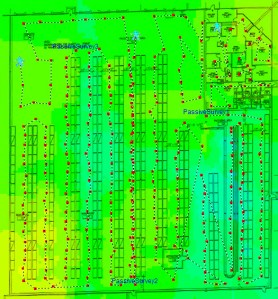
Active Site Survey
Each of the red dots represents a data point of the measured signal strength and noise level at that particular spot. Because active site surveys take measurements of live data, they are much more accurate than predictive analysis, which relies on computer modeling. Beyond being more accurate, active site surveys offer many advantages:
- On site personnel can conduct interference analysis, including from WiFi and non-WiFi (Microwaves Ovens, Cordless Phones, Bluetooth, etc.) sources
- On site personnel can conduct a rogue security sweep in conjunction with an active site survey – rogue access points, ad-hoc networks, and other security liabilities can be identified. This security sweep can also ensure company devices comply with corporate policies, which is helpful for audits relating to SOX, PCI, GLBA, etc.
- On site personnel can also conduct performance analysis and/or troubleshooting. Because active site surveys bring software to the “front lines”, engineers are better equipped to provide a diagnosis and recommendations
The main detractor to active site surveys are they require a decent amount of time from a knowledgeable professional. This translates into the fact that they are more expensive than predictive analysis. <company plug> My employer, Xirrus, conducts free (no-obligation) active site surveys as a part of our sales process. We offer a 100% performance gauruntee, which actually drives the need for an active survey. We use the survey to generate our bill of materials. Since we take real measurements using actual product, we are able to generate quotes and perform installations that we know will work – hence the garuntee. </company plug> Which site survey method do you prefer? Why? Tell me about your experiences with active vs. passive surveys in the comments below!
How Stuff Works – 802.11n and Spatial Multiplexing
Filed under: 802.11n, Spatial Multiplexing | Tags: 802.11n, MIMO, Spatial Multiplexing
Comments (19) This is the third post in my “How Stuff Works” series. The first two posting discussed MIMO and channel bonding. This post looks at another technical improvement that leads to greater speed in 802.11n networks – spatial multiplexing.
It is helpful to take a quick look at a classic 802.11 transmitter.
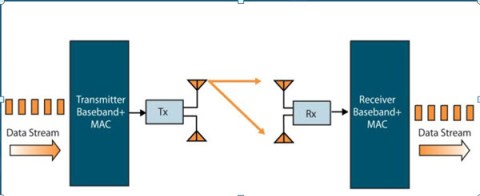
802.11 Classic Transmitter
In this scenario, only one data stream is sent from the transmitter to the receiver (represented by the orange line).
With spatial multiplexing, multiple data streams are transmitted at the same time. They are transmitted on the same channel, but by different antenna. They are recombined at the receiver using MIMO signal processing. This is represented in the diagram above with two spatial streams – an orange colored one and a navy blue colored one.
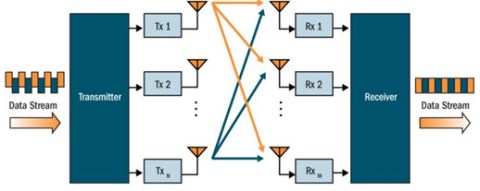
Spatial Multiplexing - Two Streams
Spatial multiplexing doubles, triples, or quadruples the data rate depending on the number of transmit antennas. Remember, you may hear three numbers when referring to 802.11n or MIMO networks – the first is the number of transmit antenna, the second is the number of receive antenna, and the third is the number of spatial streams. For example, a 3×3x2 system has two spatial streams.
* Twitter *
I have created an accompanying Twitter page to my blog (for those of you who are craving wireless updates more than every day or two… :))
My Twitter username is “wifijedi” if you would like to “follow me”.
Or you see my updates at http://twitter.com/wifijedi
Guess what I had for lunch today? 😉
Take Note of This!
Filed under: Acess Point / Array Mounting, Implementation/Integration | Tags: Acess Point mounting, array mounting, implementation phase, note taking, project management
Comments (1) Just a quick note… on the importance of taking good notes. 🙂
I am deploying 150+ Xirrus arrays for a elementary school district here in Phoenix, Arizona. If you have been following my blog, you have seen several posts about pre-implementation planning.
We have moved past the project planning stage and into project implementation. We have configured all the devices to meet the business and technical requirements of the district and have now begun physically mounting our WiFi arrays.
If you are unfamiliar with Xirrus, we aggregate multiple radios into a single platform along with a full layer 2 non-blocking switch, dedicated threat sensor, stateful firewall, and spectrum analyzer. This allows us to provide the same coverage and capacity as other vendors with 75% less devices, cable runs, and switch ports. We also don’t add any equipment to your IDF closets and consume considerably less power.
While we deploy considerably less devices, it is still imperative to note of all installation details. While mounting the devices, it is important to take note of the location, IP address, MAC address, and device serial number. You should also note any relevant details about the environment such as exisiting rogue/SOHO APs and potential sources of interference such as microwave ovens or large motors . Lastly, note any follow up items such as where new cable runs are needed or where legacy APs (which in this case, are Cisco) need to be removed. Be sure to assign each of the follow-up activities to a responsible party as well as assign a specific deadline for accountability.
Also take digital photos. They shouldn’t replace your notes, but as the saying goes, “A picture is worth a thousand words”. Happy note taking!
A Step Back for RFID?
Filed under: RFID | Tags: case level tagging, item level tagging, pallet level tagging, RFID, Sam's Club, Sam's Club RFID
Leave a Comment In my first blog post ever (beside my introduction), I spoke about Sam’s Club requirements regarding pallet, case, and item level RFID tagging for their suppliers. Sam’s Club issued a letter in January 2008 with an aggressive schedule to require item level tagging by Oct. 2010.
However, Sam’s Club recently published a new letter to its suppliers dated Jan 15th, 2009. At a first glance, the updated letter seems to be a step backward for RFID adoption:
- Sam’s Club is reducing the fine for each pallet that arrives at its DeSoto, TX plant without an RFID tag from $3 to 12 cents per pallet (4% of the previous fine)
- The updated letter stated that case level tagging is now optional (Jan 2008 letter mandated case level tagging by 10/31/2009)
- The updated letter stated that the time line for item level tagging is now TBD (Jan 2008 letter mandated item level tagging my 10/31/2010)
The Sam’s Club initiative and DoD mandates for RFID tagging were cornerstones of RFID adoption. What do you think of these new requirements?
Upon closer inspection, it doesn’t seem all bad:
- Sam’s Club is established a new Supplier Council to help organizations understand the costs and benefits associated with pallet, case, and item level tagging
- Sam’s Club has several RFID initiatives in development to include RFID enables point of sale (POS) systems
- Case level tagging was made optional because the company feels that sellable unit (item level) tagging provides more benefit
In a way, I believe that Wal Mart and Sam’s Club are actually trying to speed up the adoption of RFID by ensuring their suppliers understand the costs vs. benefits as well push straight for item level tagging in the foreseeable future. The letter acknowledges that suppliers will need 12 to 18 months to prepare for sellable unit tagging and that an appropriate time line would be developed.
If you want to read more, view the story at RFID Update. Sound off and let me know what you think in the comments!
How Stuff Works – 802.11n and Channel Bonding
Filed under: 802.11n, Channel Bonding | Tags: 802.11n, Channel Bonding
Comments (6) We already discussed how MIMO works. Let’s look at another technical improvement currently utilized in 802.11n – channel bonding:
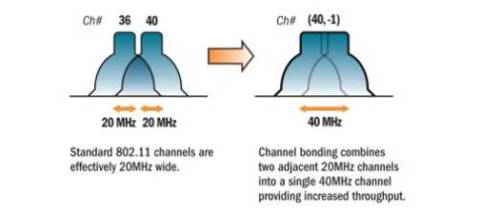
The graphic is fairly self explanatory – traditional 802.11 channels are either 20 MHz wide (OFDM) or 22 MHz wide (DSSS). Channel bonding combines two adjacent channels, which effectively doubles the amount of available bandwidth.
One footnote to channel bonding is that it works best in the 5GHz frequency band, as there is only space for three traditional, non-overlapping channels in the 2.4GHz frequency band. Therefore, there is only enough space for one bonded channel in that portion of the RF spectrum.
Gigabit Wireless Expected in 2009?!?
Filed under: Interesting Articles | Tags: 802.11n, Ethernet replacement, Gigabit wireless, MIMO
Leave a Comment While we are on the topic of 802.11n and speed, I thought this was an applicable story that appeared on Network World’s website earlier in the week.
It talks about Quantenna Communications plans to release a 4×4 MIMO chip set in Q3 of 2009 that is capable of 1 Gbps wireless bandwidth (600 Mbps of throughput).
With 100+ Mbps throughput currently provided by 802.11n, most desktop applications have more than enough bandwidth. Gigabit Wireless would certainly eliminate speed as one of the obstacles to replacing Ethernet with wireless.

![[LinkedIn]](https://i0.wp.com/farm4.static.flickr.com/3477/3463037125_247575d1f3_m.jpg)
![[LinkedIn]](https://i0.wp.com/farm4.static.flickr.com/3598/3463037145_924738ec38_m.jpg)
![[del.icio.us]](https://i0.wp.com/images.del.icio.us/static/img/delicious.small.gif)
 WiFi Jedi.com
You must be logged in to post a comment.