The Next Great Wireless LAN Vendor
Filed under: Interesting Articles, WLAN Vendors | Tags: current economic state, WLAN vendor selection, Xirrus
 Comments (2)
 I wrote this as a guest post for An Information Security Place, but republished here for my readers.
————————————————————————————————————————————————————–
Yesterday was one of the few days that I bought a hard copy of the USA Today newspaper. I get the Arizona Republic paper delivered to the house daily. I even get six copies of the Sunday paper (don’t ask…) I bought it because one headline on the cover page of the USA Today caught my attention. It was “Who Might Rise From the Wreckage” with a subtitle of “It’s happened before – Cisco and MySpace emerged in tough times. Tech can bloom again“.
The headline and subtitle brought up a good point. In the economic crash of the late 1980’s, Cisco began it’s rise as one of the large tech companies. The article mentions Facebook and MySpace as companies who had a similar rise after the dot-com crash. Personally, I remember two *other* (more relevant to networking) companies who accomplished a similar jump in market share in the wake of the dot-com crash – Foundry Networks and Extreme Networks.
This economic downturn presents the same opportunity for tech companies to rise out of the aftermath stronger than when they entered. Who are likely candidates this go-around? I would suggest that the opportunity is particularly ripe for Wireless LAN vendors.
Why? There are several reasons WLAN manufacturers have an opportunity to grab market share in this economy, especially compared to their wired counterparts. Most reasons point back to the fact that organizations are now forced to do more with less.
During these times companies…
- …need to get more out of their employees – WLANs enable their employees to be connected everywhere in their enterprise all the time
- …will not want to invest in permanent infrastructure – WLANs can easily be moved from location to location vs. desktop switches / cabling
- …will want even tighter security because of dismissed employees and competitive pressures – WLANs allow for easy deployment of 802.1X port based authentication and can execute rapid adds and deletes
Which WLAN vendor is poised to take advantage of such a situation? Aerohive? Bluesocket? Meru? Rukus? Xirrus? Let me know what you think in the comments section! Be sure to state specific reasons that you think one vendor will be able to gain more market share than another. Also, if you like this post, check out my blog for related info such as 50 Questions K-12 School Districts Should Ask WLAN Vendors.
50 Questions K-12 School Districts Should Ask WLAN Vendors
Filed under: Vendor Selection, WLAN Vendors | Tags: vendor questionnaire, WLAN vendor selection
Comments (1) Lately, I have been working on a large, district wide wireless implementation here in Phoenix. It has served as inspiration for several blog posts about pre-implementation planning, as well as the importance of taking notes during system installation.
Working on this project sparked another thought – how do K-12 School Districts choose their wireless vendor in the first place? What should they consider in vendor selection? Below is my list of 50 questions districts should ask prospective WLAN vendors. After reading the list below, are there any questions you think I missed?
General
- Does WLAN vendor support all standard LAN and WLAN standards without proprietary solutions or protocols that will limit the ability to expand the Wi-Fi network?
- Can the vendor provide like type references?
- Is the platform, firmware, and software upgradable to support future evolution of the 802.11 standard (i.e. 802.11n, 802.v, 802.11w, etc.)?
Site Surveys
- Does the vendor provide site survey services?
- Is there a separate cost for this?
- Does the vendor perform the survey?
- Is the same equipment to be deployed used for the survey?
- Is it a live survey, vs. just predictive software?
- Do they perform a Spectrum Analysis to identify possible noise sources?
- Do they guarantee the results?
- Will they provide heat maps of the coverage?
Product Installation
- Will the vendor do the install?
- Is the installation free?
Support Services
- Does the vendor directly support their products or is support via a 3rd party?
- Does the vendor offer free on-site customer training on their product?
Coverage
- Is Access point able to support all 802.11a channels (extended channels)?
- Is access point able to simultaneously support 802.11 a/b/g radios?
- Does the Access Point offer integrated high gain antennas for greater range?
Bandwidth and Supported Channels
- How much bandwidth does each device provide via 802.11b?
- How much bandwidth does each device provide via 802.11g?
- How much bandwidth does each device provide via 802.11a?
- How much bandwidth does each device provide via 802.11n?
Capacity
- Does the Access Point support multiple (4 or more) independent radios?
- Does the Access Point offer a sectored antenna architecture, which equals higher data rates at longer ranges?
Security
- Are the following security services supported:
- WEP, WPA & WPA2?
- Authentication: Open, MAC, 802.1x, Web Page Redirect?
- Integrated Stateful Firewall in the AP?
- Integrated RADIUS server in the AP?
- Integrated IDS/IPS sensor?
System Design
- Is switching performed at the Access Point?
- Is QoS tagging applied at access point?
- Is Filtering/Firewall Policies applied at Access point?
- Is encryption/decryption performed at the Access Point?
- If encryption/decryption performed at controller how many APs can it support before being oversubscribed?
- Are Wireless Distribution Services (WDS) available in the AP?
High Availability
- Do proposed APs offer redundant uplink ports?
- Is Radio-to-Radio failover available?
Power
- Is Direct AC power supported?
- Is POE over Gigabit connections supported?
- Does the AP support AC/DC redundancy?
RF Management Tools
- Does the proposed system offer an Integrated Spectrum Analyzer?
- Does the proposed system offer Auto Cell Sizing?
- Does the proposed system offer Auto Load Balancing?
- Does the proposed system offer Auto Channel Selection?
System Management Tools
- Does the proposed system offer Serial/CLI management?
- Does the proposed system offer Centralized SNMP management?
- Does the proposed system offer Web Based Management?
- Does the proposed system offer Management over the air?
- Does the proposed system offer Secure Management (SSH, HTTPS, etc.)?
- Can management traffic be disabled on all interfaces?
New Wireless Standard – IEEE 1902.1

Ruby?
Ruby? No, RuBee. The new IEEE Standard for wireless visibility networks. RuBee is an alternative to other RFID technologies such as UHF, HF, etc. How does it compare to these other technologies? The new IEEE standard, IEEE 1902.1, is intended for providing low bandwidth where low cost, high tag count, and long battery life are requirements. RuBee operates below 450 Khz and is especially effective in harsh environments such as around metal and water. These have traditionally been problem areas with other RFID products.
However, RuBee only provides speeds of 300 to 9600 baud, which might present an issue for many applications. RuBee has a respectable range of 10 to 50 feet and is expected to be implemented in hospital environments, and high security government facilities.
There seem to be many competing technologies to RuBee. Recently, there have been many advances to passive-UHF RFID tags. The read ranges now quite frankly shock me. There also have been ongoing improvements in the amount of data stored in UHF tags as well as the security of tag. Active RFID & RTLS have also been gaining momentum. In that sense, I really think it is an uphill battle for any new technology where there are existing technologies that already serve the market place. At the end of the day, I think that IEEE approving a new standard will go a long way to commercializing the product and encouraging more wide spread adoption.
What do you think? Is RuBee going to be widely used and accepted? In what industries? In what applications? How is it going to be better and/or different than exisiting RFID technologies. Post what you think in the comment section below.
An Information Security Place
Filed under: blogging, Implementation/Integration, Verification Testing | Tags: An Information Security Place, Veriwave, WLAN field testing, WLAN verification testing
Comments (2) If you are wondering why I didn’t post yesterday, it is because I served as a guest author on another blog, An Information Security Place. This blog was created by a friend and former colleague of mine, Michael Farnum. It is *really* popular – you should check it out! How popular do you ask? Well, if you type “an information security place” into the main page of Google, you will get approx. 25 million results. That is pretty impressive, considering the terms “802.11n” and “WiFi hotspots” only return approx. 12 million results combined.
My post yesterday was titled Factors Determing Installed WLAN Quality, and came out of a phone conversation that I had with Veriwave’s CTO and VP of Marketing earlier in the week. We spoke about the focus on wireless coverage and low interference when field testing WLANs. At a high level, we all agreed there were many other factors to consider, shown in the chart below:
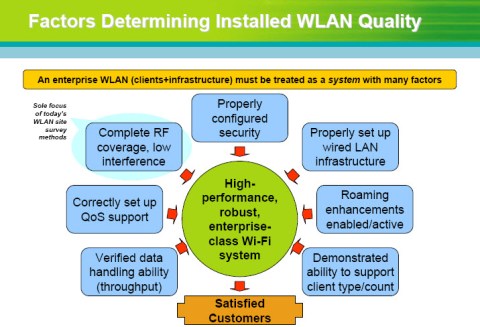
Factors Determining Installed WLAN Quality
Check out the post at An Information Security Place. Happy Reading!
How Stuff Works – 802.11n Frame Aggregation and Block ACKs
Filed under: 802.11n, MAC Improvements | Tags: 802.11n MAC Improvements, Block ACKs, Frame aggregation, how stuff works - 802.11n
Comments (4) Here’s another guest post that I wrote for a friend of mine. Check out his blog “Hip Technology“. Again, the “How Stuff Works” posts have been so popular on https://wifijedi.wordpress.com that I am re-posting what I wrote here.
————————————————————————————————————————
I have posted several times on technical improvements related to 802.11n and thought that I would continue that format here. For this post, I would like to discuss frame aggregation and block acknowledgment.
In normal 802.11 operation, each directed data and management must be acknowledged. This ACK takes the form of a 14 byte packet. This is shown in the top row of the graphic.

802.11n MAC Improvements
With frame aggregation, up to 64 MSDUs (MAC Service Data Units – essentially layer 2 frames) can be sent at one time. This “super” frame has one physical layer header, then data frames (each with their own MAC header). Once all the data has been sent, a block acknowledgment is sent. This is shown in the bottom row of the graphic.
This is more efficient for several reasons:
- A physical layer header does not have to be transmitted for each data frame.
- The block acknowledgment is much shorter than 64 separate ACKs.
- There are far fewer interframe spaces as all the data is aggregated into one burst and all the acknowledgments are bundled together.
Block Acknowledgments are also used under 802.11e Quality of Service.
How Stuff Works – 802.11n and Short Guard Interval
Filed under: 802.11n, Short Guard Interval | Tags: 802.11n, Geekster, how stuff works - 802.11n, intersymbol interference, Short Guard Interval
Comments (16) This is a post that I wrote the other day as a “guest post” for a co-worker’s blog. It is a Xirrus sponsored blog, titled “Geekster”. The URL for the blog is http://geekster1.blogspot.com/ The guest post was part of a series, “How Stuff Works”, which has been one of the most successful portions of my own blog, so I am going to re-post for my faithful readers. 🙂
—————————————————————————————————————————–
In the first several “How Stuff Works” posts, I have been talking about technical improvements to 802.11n such as MIMO antennas, Spatial Multiplexing, and Channel Bonding. In this post, I want to talk about another such technical improvement, Short Guard Interval.
The guard interval is the space between symbols (characters) being transmitted. This is often confused with the space between packets, which is the interframe space (IFS). The guard interval is there to eliminate intersymbol interference, which is referred to as ISI. ISI happens when echos or reflections from one symbol interfere with another. Adding time between symbol transmission allows these echos and reflections to settle in before the next symbol is transmitted. In normal 802.11 operation, the guard interval is 800 ns.
With 802.11n, short guard intervals are possible. The short guard interval time is 400ns, or half of what it used to be. Shorter wait time (guard interval) between symbols increases throughput. However, if it’s too short, the amount of ISI will increase, and throughput will decrease. On the other hand, if the guard interval is too long, there is increased overhead due to the additional idle time. If you look at an 802.11 Modulation and Coding Scheme (MCS) chart, you will see that Short Guard Interval increases the data rate by roughly 10-11%.
Check out my blog at http://wifijedi.wordpress.org for other “How Stuff Works” postings as well as other information and opinions on wireless networking and security!
Back|Track 4 Beta Public Release
Filed under: Wireless Security | Tags: Back|Track 4, ethical hacking, wireless penetration testing, wireless security assessment, wireless security audit
Leave a Comment While I don’t do it nearly as much as I used to, Wireless Security Assessments and Penetration Testing are favorite activities of mine. When I first started learning, I took a course by The Shmoo Group’s Beetle (Don Baily) at DallasCON as well as one of the first versions of the SANS “Wireless Ethical Hacking, Pen Tests, and Defenses” (which was then called “Assessing and Securing Wireless Networks”). The SANS course was taught by Joshua Wright. In both of these courses, we used a Linux distro called “Auditor”. The Auditor security collection was the pre-cursor to Back|Track, and it contained many of the more popular tools for wireless assessments to include Kismet, Aircrack, and others.
At any rate, Back|Track has now grown to over 300 tools, to include CoWPAtty (to crack WPA-PSKs), Karma & Hotspotter (to attack client side vulnernabilities), and CarWhisperer & Red Fang (which address Bluetooth). The newest beta version, Back|Track 4, has just been released to the public today. I suggest you view the Back|Track 4 blog posting, which contains links to download the .iso file.
A quick word to the wise – the difference between an Ethical Hacker and a criminal is permission. Be sure you have written permission before you assess any organization with these tools. That being said, happy hacking!
Press Registration for Gartner Wireless & Mobile Summit?!?
Filed under: blogging, Industry Events, Professional Development | Tags: blogging, Gartner, Gartner Wireless & Mobile Summit, Mobile Business 2.0, Thought Leadership
Comments (1) Gartner is having their annual Wireless & Mobile Summit this month in Chicago. This is an event that I have always wanted to attend.
I am going to ask about Press Registration for the conference. I know that RSA and other large security conferences have embraced the idea of allowing bloggers to attend and post about their events. In this case, I will have to be posting from either an EVDO card or via my iPhone – which should be a natural fit for an event centered around Wireless & Mobile technologies. 🙂
The first page of the conference brochure (beyond the cover page) starts out with the phrase “Mobile Business 2.0 is coming. Are you ready?” I fully believe in Mobile Business 2.0, which is a large reason that I have beefed up my LinkedIn profile, started this blog, and created a Twitter account. I believe sharing information of this kind is extremely valuable to us as a Wireless & Mobile community. In that spirit, I hope that Gartner sincerely considers my request for a press pass as a blogger.
Sessions that look particularly interesting to me upon first glance are the ones around RFID, iPhone Forensics, and Online Society in 2020.
If you are interested in attending the event, here are some of the details (they even offer a money back guarantee):
23 – 25 February 2009 | Chicago, IL | Sheraton Chicago
Standard Conference Price
Fee includes conference attendance, documentation and planned functions. – US $2095
Money Back Guarentee
If you are not completely satisfied with this Gartner conference, please notify us in writing within 15 days of the conference and we will refund 100% of your registration fee.
Security Leadership Essentials
Filed under: External Training, Professional Development | Tags: MGMT 512, SANS, SANS Phoenix, Security Leadership Training
Leave a Comment I am excited to announce that I will be attending the SANS Conference here in Phoenix March 23rd – 30th, 2009.
I have taken several SANS Courses before, including “Wireless Ethical Hacking, Pen Testing, and Defenses” and “Securing Windows”. This go around I will be taking “SANS Security Leadership Essentials for Managers“. The course is being taught by the President of the SANS Institute, Stephen Northcutt.
They are actually running 9 different courses in the areas of Management, Audit, Security, and Development. No promises, but if you are interested in joining me at the Phoenix conference, send me an email at douglas.haider@xirrus.com and I will try to hook you up with a 10% discount!
I am taking part in SANS work-study program. It is where I am going to help them set up the conference, assist with on-site registration, help monitor the book store, and serve as an in-class volunteer. In exchange, SANS is offering a steeply discounted tuition rate – a great program, especially in this economy!
I plan on blogging about the course, so definitely check back to hear my thoughts on the good, bad, and the ugly! Have you taken a SANS course? What did you think? If you haven’t, which of their courses sounds the most interesting to you? Sound off by submitting a comment below!

![[LinkedIn]](https://i0.wp.com/farm4.static.flickr.com/3477/3463037125_247575d1f3_m.jpg)
![[LinkedIn]](https://i0.wp.com/farm4.static.flickr.com/3598/3463037145_924738ec38_m.jpg)
![[del.icio.us]](https://i0.wp.com/images.del.icio.us/static/img/delicious.small.gif)
 WiFi Jedi.com
Comment Moderation Policy
Filed under: blogging | Tags: blogging, comment moderation policy, What No One Ever Tells You About Blogging and Podcasting
As I am relatively new to blogging, I have been reading a couple books on the topic to maximize my value to you, the readers. One of the books I am reading is “What No One Ever Tells You About Blogging and Podcasting”. It is a great book. I actually got a signed copy in the mail from the author (Ted Demoploulos) because I provided some feedback and advice on one of his websites that deals with Information Security Certifications – www.securitycerts.org
One of the ideas it gave me was to explicitly spell out my policy regarding comments on my blog. I do moderate comments, only to filter out spam, expletives, or otherwise unprofessional comments. I don’t mind (even encourage) dissenting comments, as long as they are respectful and professional.
My hope is that this will be an open forum for people to exchange ideas and information. Please feel free to leave comments, links to related material, etc. It is this sense of community that will make wifijedi.wordpress.com a valuable resource. I look forward to hearing from you!